How to Hide Outlets and Power Strips for a Sleek Home Office
You’ve got a clean desk, a nice monitor arm, maybe even a plant that’s still alive. Then you look down and see the power strip with six cords tangled around it like a nest of snakes. That one dangling cable ruins the whole setup. This guide covers how to hide outlets and power strips in your home office setup.
The best approach starts with understanding your constraints. Are you renting? The trick is matching the right method to your situation — renter vs. homeowner, built-in desk vs. freestanding, budget vs. full reno. Here’s what actually works.
In-Wall Outlet Boxes: The Cleanest Solution
An in-wall outlet box (also called a recessed power box) sits inside your wall cavity and lets you plug in devices without a gang of plugs sticking out. You mount a TV or monitor flat against the wall, and the cables drop straight in behind it.
The Wiremold CMK70 is the standard pick here. It’s a single-gang box that mounts in a standard drywall cutout, holds a duplex outlet, and gives you about 2 inches of recessed depth. Installation takes 30 minutes if you’ve got basic drywall tools — cut the hole, fish the wire, clamp it in, patch the edges. No electrician required for the low-voltage version (just the power cord routing), though the line-voltage version needs a pro.
Legrand Wiremold CableMate kits work similarly but include a horizontal channel that routes cables between the outlet and your desk or mounted display. Good for situations where you can’t hide everything behind a single box.
💰 Buy on Amazon → Wiremold CMK70
If you’re looking for the most effective methods, paintable raceways should be near the top of your list. Landlords tend to have opinions about holes in their walls, and the $15 peel-and-stick solutions below will save you a lot of grief.
Furniture Grommets: The $5 Fix That Makes a Real Difference
Grommets are those rubber or plastic covers with a hole in the middle that you see on office desks. They let you route cables through the desk surface instead of draping them over the back edge where everyone can see them.
Most prebuilt desks come with at least one grommet hole. If yours doesn’t, a 3M grommet kit runs about $12 for a pack of two and installs with a hole saw or a step bit in under 10 minutes. Pick a spot near where your power strip sits, route your cables down through the hole, and you’ve eliminated the most visible part of the mess.
For cable routing underneath the desk, pair grommets with a cable tray (covered below). The combination keeps everything off the floor, off the desk surface, and out of your line of sight.
💰 Buy on Amazon → 3M Desk Grommet Kit
When people ask about hiding outlets on a budget, grommets plus a basic cable tray is the answer that actually matters. Everything else is polish.
Paintable Raceways: Cord Covers That Blend Into the Wall
Raceways (also called wire mold or cord covers) are plastic channels that stick to your wall and hold cables flat against the surface. The best ones come primed white so you can paint them to match your wall color. From across the room, they disappear.
Wiremold CABLEMATE raceways come in kits with pre-measured channels, elbows, and T-joints. Cut them to length with a hacksaw or utility knife, stick them up with the included adhesive backing, and run your cables inside. Paint them with the same wall color and they’re nearly invisible.
These work well when you need to route cables along a baseboard or up a wall to a wall-mounted monitor. They’re not as clean as in-wall boxes, but they’re reversible — peel them off and fill the tiny adhesive marks with a dab of spackle when you move out.
For the best results, route cables along natural edges: baseboards, door frames, window trim. Running a raceway diagonally across an open wall defeats the purpose.
Desk-Mount Power Solutions: Power Where You Need It
Desk-mount power units attach to the underside or back edge of your desk and give you outlets and USB ports right where you work. No floor power strip, no wall hunting.
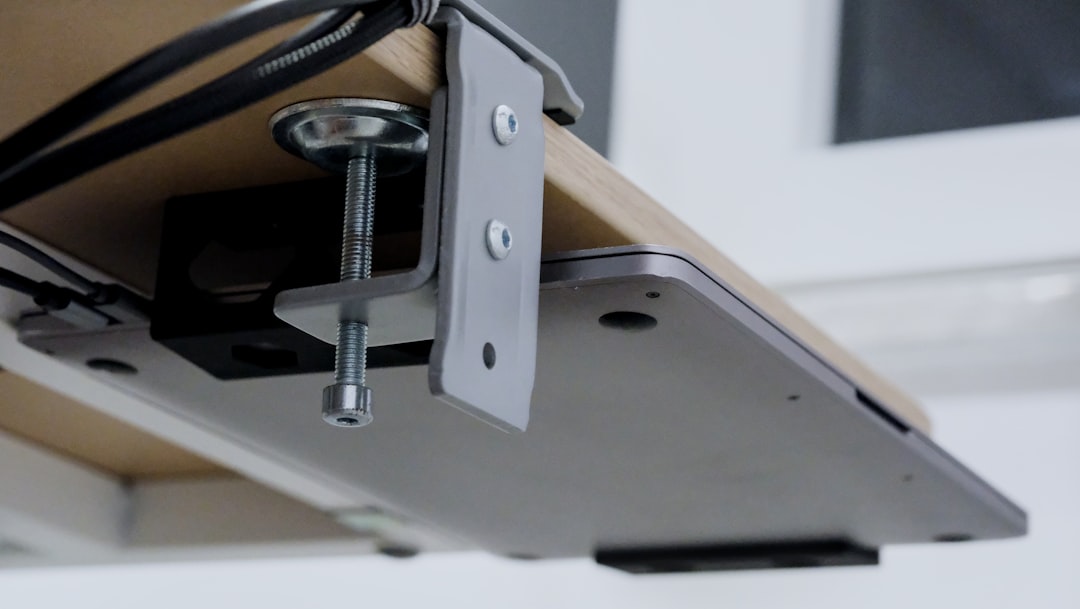
The Echogear desk-mount power strip clamps to the back edge of most desks and provides six AC outlets plus two USB-A ports. At around $35, it replaces a floor power strip entirely. Cables route from your devices to the strip and then drop down through a grommet to the wall outlet in one clean run.
Kensington SmartSocket models sit in a desk grommet hole — you literally drop the unit into the hole, and it sits flush with the desk surface. That gives you outlets on top of the desk without a visible power strip. It’s the cleanest look if your desk has a grommet hole large enough (most accept the standard 80mm or 60mm sizes).
💰 Buy on Amazon → Echogear Desk-Mount Power Strip
If you’re building a desk or buying one new, look for models with built-in power integration. UPLIFT Desk and Fully Jarvis both offer power-dock add-ons that mount flush in the desk frame. That’s the gold standard for hiding outlets in a home office if you’re in the market for a standing desk anyway.
Cable Management Trays: What Goes Under the Desk Stays Under the Desk
A cable management tray (sometimes called a cable basket) mounts under your desk and holds all your power strips, adapters, and loose cables. If you can see under your desk, this is the difference between looking like a server room and looking like a normal room.
The J Channel cable tray from Amazon Basics runs about $18 and mounts with two screws. It’s wide enough for a standard power strip plus six to eight cables. Thread everything through, zip-tie loose runs to the tray, and you’re done.
IKEA SIGNUM cable management trays are the same concept at roughly the same price — marginally better build quality, slightly harder to get if you don’t live near an IKEA.
💰 Buy on Amazon → Amazon Basics Cable Tray
Pair a tray with furniture grommets: cables come up through the grommet to your devices, power strip sits in the tray below, and one clean cord drops from the tray to the wall outlet. That’s the setup that makes visitors ask if you actually use a computer.
Full-Reno Options: When You Own the Place
If you’re a homeowner doing a remodel, you can bury the problem entirely.
Pop-up floor outlets install flush in the floor and sit hidden until you press the cover. They’re standard in new commercial builds but less common in residential. A Wiremold pop-up outlet runs $50–80 and requires routing a circuit to that floor location, so factor in electrician costs.
In-floor cable channels like the Connectrac system run a low-profile track along the floor surface that hides power and data cables. They’re designed for open-plan offices but work in home settings with hard flooring. If your office has carpet, you’d need to pull it up, which adds labor.
💰 Buy on Amazon → Wiremold Pop-Up Floor Outlet
For anyone serious about hiding outlets and power strips in home office setups that look professional, combining an in-wall recessed box behind the monitor, a floor outlet at desk level, and a desk-mount power strip with a cable tray underneath gives you a setup with zero visible cables. It’s not cheap — expect $200–500 in materials plus electrician fees — but it’s the kind of thing you do once.
Putting It Together: What to Buy Based on Your Situation
| Situation | Solution | Cost |
|---|---|---|
| Renter, tight budget | Grommets + cable tray + cord clips | Under $40 |
| Renter, wants it clean | Paintable raceways + desk-mount strip | $50–80 |
| Homeowner, no reno | In-wall box + cable tray + desk-mount | $80–150 |
| Homeowner, remodeling | Floor outlet + in-wall boxes + desk power | $200–500+ |
The biggest impact for the least money is almost always the cable tray + grommet combo. Everything else adds incremental improvement.
Quick-Start Guide to Hiding Outlets in Your Home Office Checklist
- Mount a cable management tray under your desk
- Move your power strip into the tray
- Route cables through furniture grommets instead of over the desk edge
- Use adhesive cord clips to keep wall runs tight against baseboards
- If cables need to cross open wall space, use paintable raceways
- For wall-mounted monitors, install a recessed in-wall outlet box
- Replace your floor power strip with a desk-mount power unit if possible
That sequence handles 90% of cable clutter problems without calling an electrician.
Frequently Asked Questions
Can I install an in-wall outlet box without an electrician?
The low-voltage version (no power wiring, just cable pass-through) is a DIY job — cut the drywall, insert the box, run your monitor cables through it. The line-voltage version that adds an actual outlet requires electrical work. If you’re not comfortable working with household wiring, hire an electrician. It’s a 30-minute job for them and not worth the risk of doing wrong.
Do paintable raceways actually blend in after painting?
Yes, if you match the paint. Use the same wall paint with a small brush — two coats, light sanding between. From more than three feet away, you won’t see them. The texture match isn’t perfect (it’s smooth plastic vs. textured drywall), but it’s close enough for a home office.
What’s the best desk-mount power strip for a standing desk?
The Echogear desk clamp power strip works well because it moves with the desk when you raise or lower it. Fixed units that mount to the wall don’t work with height-adjustable desks. If you’re buying a new standing desk, get one with a factory power dock — it’s cleaner than any aftermarket solution.
Can I hide power strips inside furniture?
Yes, with caveats. You can mount a power strip inside a desk pedestal, a credenza side panel, or the hollow leg of some desk frames. Make sure the enclosure has ventilation — power strips generate heat, and stuffing one inside a sealed drawer is a fire risk. Use a strip with individual switches so you can kill power to devices you’re not using.
What’s the cheapest way to hide cables without drilling holes?
Adhesive cord clips (about $8 for a pack of 20) plus a ** velcro cable tie** kit ($10) gets you most of the way there. Clip cables to the underside of your desk, down the desk leg, and along the baseboard to the wall outlet. It’s not as clean as a cable tray, but it costs under $20 and works in any rental.
When you’re setting up a home office, the power situation is easy to ignore until you can’t. Anyone learning outlet-hiding techniques should start with the cable tray and grommets — they solve most of the problem for under $40. Add raceways or desk-mount power as your budget and lease allow. And if you own the place and are due for a remodel, the full in-wall and floor outlet treatment is worth every penny. Your desk will look like it belongs in a showroom, and you’ll never think about it again.