How to Build a Portable UPS Power Station for Smart Home Gear
Keeping your smart home online during an electrical outage is crucial for maintaining security, automated climate control, and communication. In this comprehensive guide, we will show you how to build a reliable backup system using a portable ups power station. By choosing a high-capacity power station with built-in UPS (Uninterruptible Power Supply) bypass functionality, you can ensure that your critical network gear never drops a packet, even when the grid goes completely dark.
Smart home networks are incredibly vulnerable to even minor electrical fluctuations. A brief brownout that lasts only a few seconds can trigger a cascade of issues: your modem reboots, your smart home coordinator loses connection to its sensors, and your security cameras stop recording. By the time everything boots back up and reconnects, several minutes have passed, leaving your home unprotected. Designing a centralized backup power solution is the ultimate insurance policy against grid instability.
Choosing the Right Portable UPS Power Station for Your Network
A portable ups power station keeps your router, modem, and smart hubs online during power outages. Standard computer UPS backups are only designed to keep a desktop PC running for 10 to 15 minutes—just enough time to save your work and shut down. In contrast, a modern LiFePO4-powered power station can run your entire home network, security cameras, and smart home coordinators for 12 to 24 hours or even longer.
Using a portable ups power station is much more efficient than using individual small backup units scattered around your home. By consolidating your core smart home gear onto a single, high-quality power station, you simplify maintenance and gain real-time monitoring of your power consumption. Many modern power stations feature advanced mobile apps that let you monitor input, output, and battery health remotely.
When selecting a portable ups power station, make sure to calculate your total power consumption. A typical home router and modem draw between 15 and 30 watts combined. Adding a smart home hub like Home Assistant and a few security cameras might bring your total continuous draw to 50 watts. Armed with this number, you can select a battery capacity that fits your targeted backup duration.
Most home users will find that a portable ups power station with 500Wh capacity is ideal. This size strikes the perfect balance between portability, physical footprint, and backup runtime, providing roughly 10 hours of continuous power for a 50-watt load. If you experience longer blackouts, upgrading to a 1000Wh unit will keep your digital life running smoothly for an entire day.
Choosing a power station with LiFePO4 battery chemistry is non-negotiable for long-term standby use. Unlike older lithium-ion batteries which degrade quickly when kept at 100% charge, LiFePO4 cells are exceptionally stable and can sustain thousands of full charge cycles while retaining over 80% of their original capacity. This makes them ideal for permanent integration into your home infrastructure.
Step-by-Step Setup Guide
Setting up your portable ups power station is simple and takes less than thirty minutes. Follow these detailed steps to build a bulletproof power backup system for your home network:
- Position the Power Station: Place your unit in a well-ventilated area near your central network switch or router closet. LiFePO4 batteries generate minimal heat but require adequate airflow during rapid charging.
- Connect to Wall Power: Plug the AC input cable of your power station directly into a standard wall outlet. The unit will charge to 100% and then automatically switch to bypass mode, running your equipment directly from the wall.
- Plug in Your Smart Home Gear: Connect your modem, router, network switch, and smart home coordinators to the AC outlets on the power station. Turn on the AC output button on the unit to enable power delivery.
- Configure Auto-Restart Settings: Ensure that your power station is set to automatically resume power output once AC wall power is restored after a prolonged blackout that fully drains the battery.
- Set Up Remote Monitoring: Connect the power station’s companion app to your guest WiFi network to receive real-time notifications about power outages and battery status.
Top Backup Power Stations Reviewed
EcoFlow DELTA 2
💰 Buy on Amazon → EcoFlow DELTA 2
The EcoFlow DELTA 2 is an exceptional choice for home networking backup. It features a robust 1024Wh LiFePO4 battery and a lightning-fast <30ms EPS (Emergency Power Supply) transition time, which is fast enough to prevent home routers and NAS units from rebooting during a power outage.
- Capacity: 1024Wh (expandable up to 3000Wh with extra batteries).
- Battery Chemistry: LiFePO4 (retains 8% capacity after 3000+ charge cycles).
- AC Output: 1800W continuous (2700W surge).
Its advanced thermal management and fast charging capability (0 to 8% in 50 minutes) make it incredibly reliable for areas prone to consecutive brownouts. When utility power returns, the Delta 2 can recharge itself at breakneck speed, ensuring you are prepared for the next outage.
We also love the extensibility of this unit. If you find your network needs grow over time, you can plug in a dedicated extra battery to double or triple your total runtime. The companion app connects over both Bluetooth and WiFi, offering deep configuration options such as custom charging speeds and battery discharge limits.
Anker SOLIX C1000
💰 Buy on Amazon → Anker SOLIX C1000
Anker is famous for its battery technology, and the SOLIX C1000 lives up to that reputation. With an ultra-fast InfiniPower design and a <20ms transition time, it makes an incredibly reliable backup source for sensitive server equipment.
- Capacity: 1056Wh (expandable to 2112Wh).
- Lifespan: Designed to last over 10 years of daily use with LFP cells.
- App Control: Full Bluetooth and WiFi monitoring of input/output metrics.
The compact footprint and quiet operation make it ideal for placement inside home office closets or entertainment centers. It features a very high-quality built-in carrying handle that is molded directly into the chassis, maximizing space efficiency.
Anker’s build quality is superb, featuring drop-proof structural designs and industrial-grade electronic components. Under normal standby conditions, the cooling fans remain completely silent, only spinning up when the unit is rapidly recharging or under heavy load, ensuring it won’t disturb your home office environment.
Jackery Explorer 500
💰 Buy on Amazon → Jackery Explorer 500
For smaller network closets or those who only need to keep a basic router and modem online, the Jackery Explorer 500 is a classic, highly portable option. While it lacks an ultra-fast EPS bypass, it can be paired with a small inline UPS for seamless transition.
- Capacity: 518Wh lithium-ion battery.
- Portability: Weighs just 13.3 lbs with a comfortable carrying handle.
- Outputs: Standard AC outlet, three USB-A ports, and two DC ports.
This unit is perfect for apartment dwellers who want a simple, silent, and highly reliable power source for their critical digital communications. Its mechanical build is exceptionally robust, with a solid integrated handle and high-impact plastic housing.
The clear LCD display provides instant readings of input wattage, output wattage, and remaining battery percentage. While it uses a traditional lithium-ion chemistry, its long history of real-world reliability and excellent customer support make it a trusted fallback option.
Power Management and Safety Rules
To maximize the life of your battery backup system, observe these key safety practices:
- Never exceed the continuous AC wattage rating of your power station. Overloading the unit will trigger an automatic safety shutdown, dropping your network.
- Keep the power station dry and away from potential water leaks, especially in basements where sump pump failures could occur.
- Perform a manual test every six months by unplugging the main AC power cord to verify that your gear transitions seamlessly to battery power.
- Maintain proper ambient temperatures — Batteries operate best between 50°F and 90°F. Avoid storing your backup equipment in unconditioned attics or freezing garages.
Deep Power Quality Engineering
As you refine your home power backup strategy, you will quickly realize that power quality is just as important as power quantity. Utility grid power can be notoriously dirty during the initial phases of a storm, with rapid voltage spikes and sags that can damage delicate silicon components inside modern routers and NAS enclosures. A high-quality portable power station acts as an active power purifier, filtering out these harmful transients before they reach your equipment.
In addition to protecting your network hardware, having a dedicated portable power station on standby provides a central charging location for all your family’s handheld devices. During an extended multi-day blackout, keeping smartphones, tablets, rechargeable flashlights, and radios powered up is essential for maintaining situational awareness and emergency communication channels.
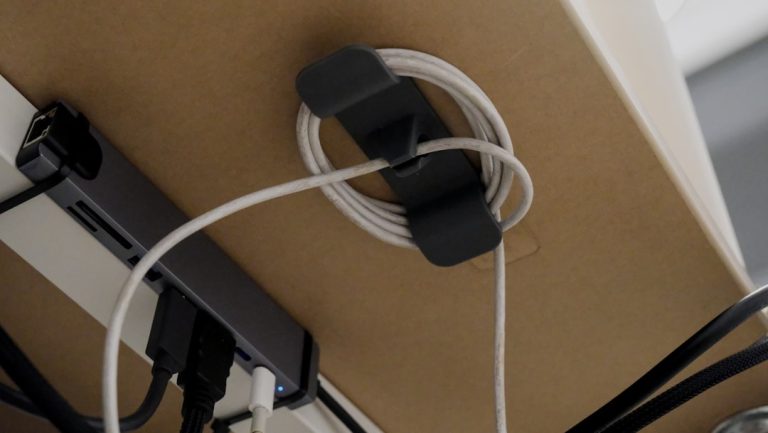
When configuring your network closet for battery backup, take a few minutes to clean up your cable management. Bundling excess power cords with high-quality Velcro ties and keeping them off the floor will prevent accidental unplugging and make it much easier to swap out components in the future. A clean, organized network rack is always more reliable and easy to maintain.
Ultimately, taking a proactive approach to smart home backup power ensures your peace of mind when bad weather strikes. Instead of scrambling in the dark with flashlights and extension cords, you can relax knowing your home security cameras are still recording, your internet is fully functional, and your automated security systems are fully armed and operational throughout the duration of the storm.
Frequently Asked Questions
How long can a portable ups power station run a home router?
A standard home router drawing 15 watts can run for over 30 hours on a 500Wh power station, or up to 60 hours on a 1000Wh power station, assuming a 90% inverter efficiency.
Will sensitive equipment like a NAS reboot during the power switch?
Power stations with an EPS transition time of less than 30ms (such as EcoFlow and Anker) will keep your NAS and router running continuously without rebooting.
Can I leave my power station plugged into the wall permanently?
Yes, high-quality units with EPS/UPS bypass modes are designed to be plugged in continuously. They pass utility power directly to your devices, preserving the battery lifespan.
Is LiFePO4 battery chemistry safer than traditional lithium-ion?
Yes, LiFePO4 (Lithium Iron Phosphate) batteries are significantly more chemically stable, have a much higher thermal runaway threshold, and last up to five times longer than standard lithium-ion batteries.
Can I connect solar panels to charge my power station during an extended blackout?
Absolutely. Most modern power stations feature built-in MPPT solar charge controllers, allowing you to connect portable solar panels to recharge the battery while it continues to power your smart home gear.
Additional Resources
For more information on home electrical systems and backup safety, consult these official resources:
– Google Smart Home Energy Management
– Amazon Home Power and Utility Devices
– Wikipedia Definition of Uninterruptible Power Supply
– GitHub Smart Home Battery Monitoring Integrations
You can also read our in-depth guides on wiredhaus.com:
– Smart Home Battery Backup Guide
– Building a Smart Home From Scratch in 2026
– Cybersecurity Best Practices for Your Home Network

One Comment
Comments are closed.