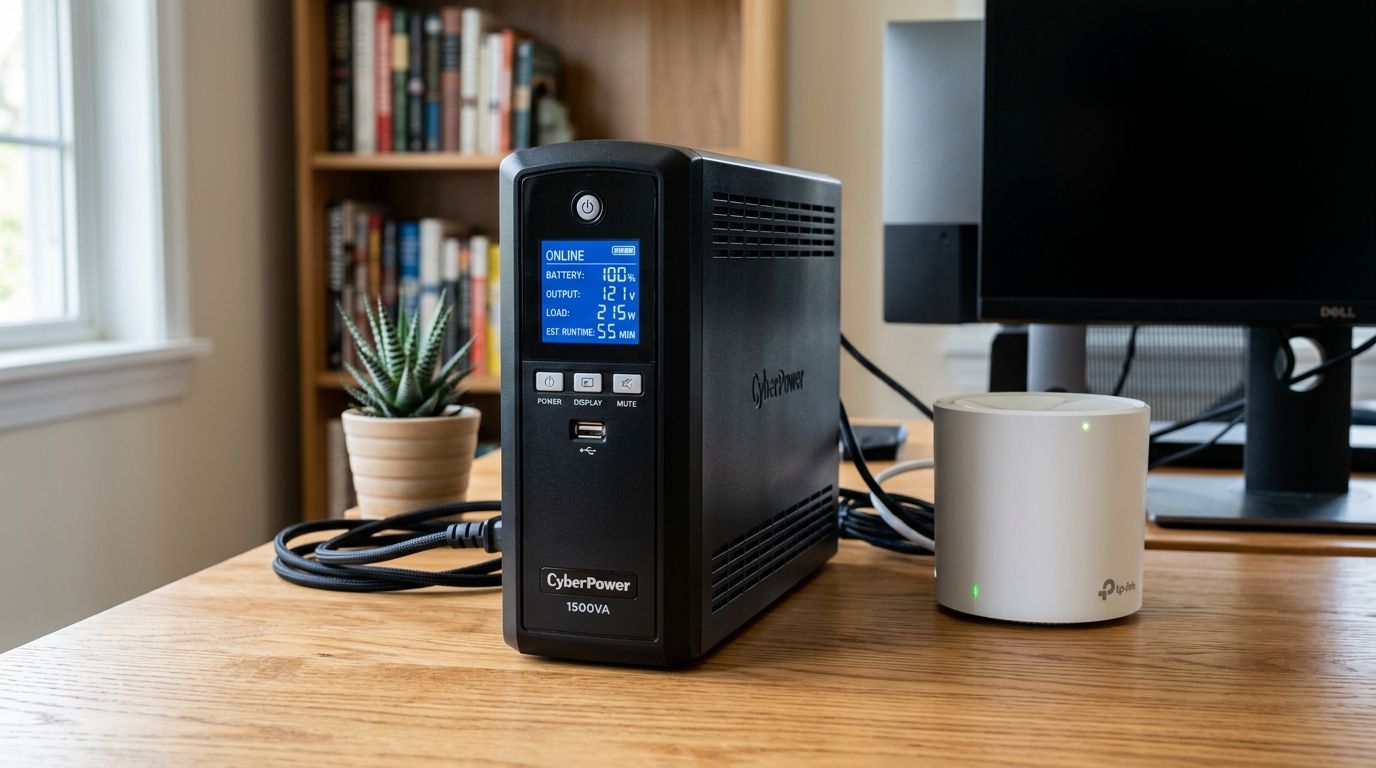
How to Choose a UPS for Your Home Network
In an always-on world, a stable internet connection is no longer a luxury—it’s essential. We rely on our home networks for everything from remote work and online education to streaming entertainment and managing our smart homes. However, all it takes is a brief power flicker or a brownout to knock your entire network offline, causing dropped video calls, interrupted downloads, and a non-responsive smart home. This is where an uninterruptible power supply (UPS) becomes a critical component of your setup. Choosing the right UPS for your home network ensures that your digital life remains uninterrupted, no matter what’s happening with your utility power. This guide covers the ups for home network in depth.
A UPS is essentially a battery backup that sits between the wall outlet and your sensitive electronics. As explained by industry leaders like APC, its primary job is to provide instantaneous power the moment it detects a problem with the incoming electrical supply. For a home network, this means keeping your modem, router, and any network switches powered on through short outages, giving them a graceful shutdown during longer ones, and protecting them from damaging power surges. This guide will walk you through everything you need to know to select the perfect UPS for home network stability.
Understanding UPS Terminology and Key Features
Before you can choose the right UPS, it’s important to understand the technical specifications you’ll encounter.
-
VA (Volt-Amperes) vs. Watts: This is the most confusing spec for beginners.
- Watts (W): This measures the actual power your devices draw. All your equipment will have a wattage rating, and this is the number you must focus on.
- VA (Volt-Amperes): This is the “apparent power” and will always be a higher number than the wattage due to a factor called the “power factor.” Most modern electronics have a power factor between 0.6 and 1.0.
- Rule of Thumb: Always size a UPS based on the total wattage of the devices you plan to connect. For a more technical explanation, VA is the product of voltage and amperage, while wattage is the VA multiplied by the power factor of the connected devices. Mismatched VA and Watt ratings can lead to either undersizing your UPS or overspending. Always prioritize the Watt rating.
-
Waveform Type: Simulated vs. Pure Sine Wave: This refers to the quality of the AC power the UPS generates from its battery.
- Simulated Sine Wave: This is a stepped approximation of a pure sine wave. It’s perfectly adequate and cost-effective for most home networking equipment like modems, routers, and switches, as their simple power supplies can easily handle it.
- Pure Sine Wave: This produces a smooth, clean electrical signal identical to what comes from a wall outlet. It is required for more sensitive electronics like network-attached storage (NAS) devices with active power factor correction (PFC) power supplies. Using a simulated sine wave UPS with a device that requires pure sine wave can cause the device’s power supply to buzz, run hotter, or even fail to power on when on battery. For just a basic router and modem, it’s overkill, but it’s the safest choice if you’re protecting a more complex setup.
-
Topology: Standby, Line-Interactive, and Online:
- Standby (or Offline): The most basic and affordable type. It passes wall power directly to your devices and only switches to its battery when it detects a problem. There’s a tiny switchover time (a few milliseconds), but it’s fast enough for most consumer electronics.
- Line-Interactive: This is the sweet spot for a UPS for home network use. It includes an automatic voltage regulator (AVR) that actively corrects for minor power fluctuations (brownouts and sags) without switching to the battery. This preserves battery life for a true outage and provides better protection for your equipment from everyday power inconsistencies.
- Online (or Double-Conversion): The most advanced and expensive type. It constantly regenerates power, completely isolating your devices from the incoming AC supply. This provides perfect, clean power with zero switchover time. It’s overkill for home networking gear and is typically used for critical servers and medical equipment where even a millisecond of power interruption is unacceptable.
How to Calculate Your Power Needs
Sizing your UPS correctly is the most important step.
- List Your Devices: Make a list of every piece of network gear you want to protect. This typically includes your modem, router, any network switches, and perhaps a NAS or a smart home hub.
- Find the Wattage: Look for the power consumption in watts (W) for each device. This is often printed on the power adapter or in the device’s technical specifications. If you can only find amps (A) and volts (V), you can calculate the wattage: Watts = Volts x Amps.
- Sum the Total Wattage: Add up the wattage of all the devices. For example:
- Modem: 10W
- Router: 20W
- 8-Port Switch: 15W
- Total Load: 45W
- Add a Buffer: It’s a best practice to choose a UPS with a wattage capacity that is at least 20-25% higher than your total load. This gives you room for future expansion and ensures the UPS isn’t running at its maximum capacity, which can shorten its lifespan. For our 45W load, a UPS with a capacity of at least 60W would be appropriate, preventing the unit from being overworked. Properly sizing your UPS is not just about meeting the minimum requirements, but ensuring long-term reliability and performance for your critical network infrastructure.
Determining Your Required Runtime
Once you know your power load, you need to decide how long you want the UPS to keep your network online during an outage.
- 5-10 Minutes (Graceful Shutdown): For most people, this is all that’s needed. This provides enough time to survive short power flickers and gives you time to save your work and safely shut down connected devices like a NAS during a longer outage.
- 30-60 Minutes (Maintain Connectivity): If you frequently work from home and need to stay online to finish a task or a video call, a UPS with a larger battery can provide a longer runtime.
- 1+ Hours (Critical Infrastructure): If your network runs critical systems, like security cameras or essential smart home automations, you’ll need a UPS with a significantly larger battery capacity or the ability to add external battery packs.
UPS manufacturers like CyberPower provide runtime calculators on their websites. You can plug in your total wattage load, and they will show you the estimated runtime for each of their models.
Recommended UPS for Home Network Setups in 2026
Here are our top picks for different home network needs.
Best for Basic Setups: CyberPower ST625U Standby UPS
This compact and affordable UPS is perfect for protecting just a modem and a router.
💰 Buy on Amazon → CyberPower ST625U
With 360W of capacity, multiple outlets, and USB charging ports, the ST625U is a fantastic entry-level choice. Its small form factor allows it to be tucked away easily. For a typical modem/router combo (around 30W), it can provide over 30 minutes of runtime, more than enough to outlast most common power flickers.
Best Overall Value: APC BE600M1 Back-UPS
A line-interactive UPS from a leading brand that provides excellent protection and features for the price.
💰 Buy on Amazon → APC BE600M1
The APC BE600M1 is a workhorse. It features 7 outlets (5 on battery, 2 surge-only), a 330W capacity, and the crucial automatic voltage regulation (AVR) of a line-interactive model. This makes it the ideal UPS for home network protection, as it can handle brownouts without draining its battery. It also has a replaceable battery, extending the useful life of the unit.
Best for Power Users and NAS Protection: CyberPower CP1500PFCLCD
A pure sine wave, line-interactive UPS that offers premium protection for sensitive network gear and NAS devices.
💰 Buy on Amazon → CyberPower CP1500PFCLCD
If your network includes a NAS, a small home server, or other sensitive electronics, a pure sine wave UPS is a wise investment. The CP1500PFCLCD provides 1500VA / 1000W of clean power, ensuring compatibility with even the most advanced power supplies. Its multifunction LCD panel provides real-time information about your power load and estimated runtime. This is the best choice for a comprehensive UPS for home network and server closets.
Frequently Asked Questions
Do I need to plug my devices into the “Battery” or “Surge” outlets?
Yes, this is critical. A UPS has two types of outlets. Only the outlets labeled “Battery,” “Battery Backup,” or with a battery symbol will provide power during an outage. The outlets labeled “Surge” or “Surge Protection Only” will protect against power spikes but will not stay on when the power goes out. Your most critical gear (modem, router, switch) must be plugged into the battery backup outlets.
How often do I need to replace the UPS battery?
The sealed lead-acid battery in a typical consumer UPS will last 3 to 5 years. Most units have a “replace battery” indicator light or alarm. Replacement batteries are readily available from the manufacturer or third parties and are usually easy to swap out.
Can I plug a power strip into a UPS?
It is strongly recommended that you do not plug a standard power strip or surge protector into the battery backup outlets of a UPS. This can overload the UPS and may void your warranty. If you need more outlets, choose a UPS model that has the number of outlets you require.
What does the USB port on a UPS do?
The USB port allows the UPS to communicate with a computer or a NAS. By connecting the USB cable and installing the manufacturer’s software (or using the native support in your NAS OS), the UPS can signal the device to perform an automated, graceful shutdown when the battery is running low during a prolonged outage.
Does a UPS protect against lightning?
A UPS provides a high level of surge protection that can defend against nearby lightning strikes that cause a surge on the power lines. However, a direct lightning strike on your home is an incredibly powerful event that no consumer-grade surge protector can be expected to stop completely. For maximum protection, a whole-home surge protector installed at your main electrical panel is recommended, as explained by the NEMA Surge Protection Institute.




3 Comments
Comments are closed.