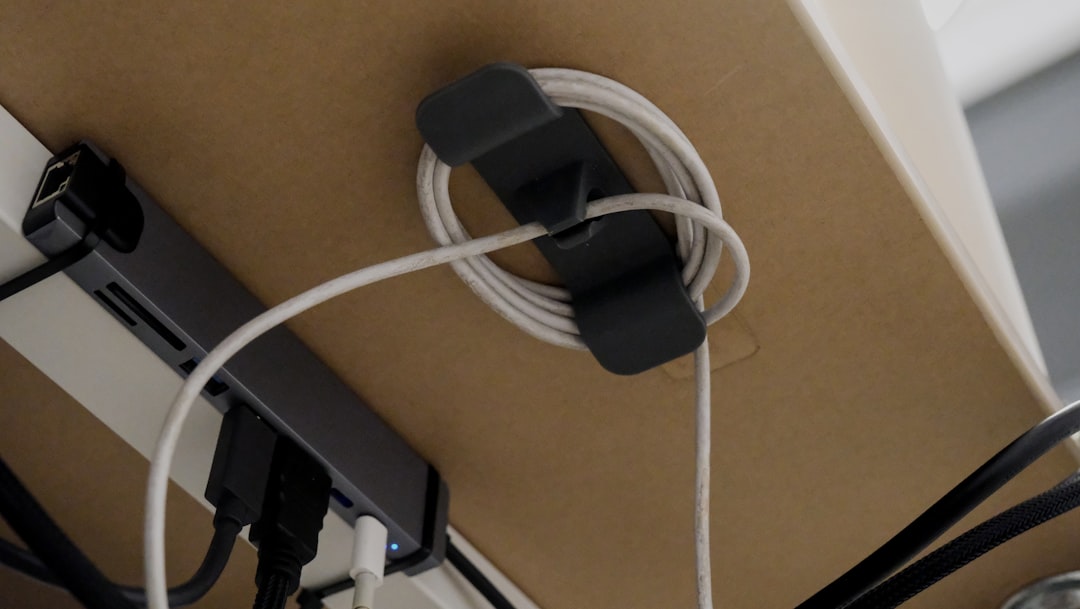
Best Under-Desk Cable Management
A messy desk undermines everything — your focus, your video call background, and the overall look of your workspace. The best desk cable management solutions for 2026 make that chaos disappear without hours of effort or expensive furniture. From simple cable trays to full spine systems, there’s an option for every desk type and budget.
This guide covers the top products across every category: cable trays, raceway channels, Velcro organizers, power strip mounts, wire spines, and more — with real recommendations and clear assessments of what actually works.
This complete guide covers everything from basic cable organization tips to advanced multi-monitor desk configurations, ensuring you can transform your chaotic workspace into a professional environment that boosts both productivity and aesthetics.
Why Under-Desk Cable Management Matters More Than Ever in 2026
The average work-from-home setup in 2026 involves a monitor arm (or two), a laptop dock, an Ethernet connection, USB hub, webcam, microphone, ring light, and at least one power strip. That’s 10–15 cables on an average desk, and most of them end up in a rat’s nest on the floor.
Beyond aesthetics, the best desk cable management approach for 2026:
– Reduces tripping hazards
– Makes cleaning easier
– Protects cables from chair damage
– Improves airflow around power strips
– Projects professionalism on video calls
The good news: the market for desk cable management has matured significantly. You can now get genuinely good results for $20–$80 depending on your setup.
Types of Under-Desk Cable Management Solutions
Before the picks, here’s a quick taxonomy:
Cable Trays — Open or enclosed trays that mount under the desk and hold a power strip + bundled cables in one horizontal run.
Cable Raceways — Channel systems that route individual cables along desk legs or walls. Often used for floor-to-desk runs.
Velcro Wraps and Cable Ties — The simple, flexible solution for bundling cables at the source.
Wire Spine / Conduit — A flexible spine that holds cables together along the desk’s underside, particularly popular for sit-stand desks.
Cable Clips and Adhesive Anchors — Small clips that stick to surfaces and guide individual cables to a port or device.
Cable Boxes — A box that hides a power strip and all its excess cable length in one clean enclosure.
The Best Under-Desk Cable Management 2026 Picks
1. IKEA Signum Cable Management Rail — Best Budget Tray
At around $15, the IKEA Signum is the most popular cable tray in the world for good reason. It’s a steel mesh tray that mounts under the desk and holds a power strip + all your cable excess off the floor. Simple, effective, and available at any IKEA.
Pros: Cheap, durable, large capacity
Cons: Requires drilling, no adhesive option
Best for: Permanent desk setups
2. J Channel Cable Raceway — Best for Wall/Leg Routing
J-channel raceways are the go-to solution for routing cables from the floor up the desk leg and out of sight. Wiremold makes the most popular version:
- Wiremold CordMate II — adhesive-mount J channel, paintable, clean finish. Amazon
- SimpleCord Slim D-Line Raceway — lower profile, popular for desk legs. Amazon
Best for: Running cable from wall outlet to under-desk power strip cleanly.
3. Alex Orpent Cable Organizer Box — Best Power Strip Concealment
A cable box sits on the floor or on a shelf and contains your power strip plus all the excess cable slack. The Alex Orpent is one of the most popular:
- Alex Orpent Cable Management Box Large — fits most 6-outlet surge protectors, multiple cable exits. Amazon
Pros: Completely hides the power strip and plug cluster
Cons: Takes up floor/shelf space
Best for: Standing desk or L-shaped desk users with a dedicated side surface
4. Velcro One-Wrap Cable Ties — Best Flexible Organization
💰 Buy on Amazon → Velcro One-Wrap Cable Ties
Velcro One-Wrap ties are the single highest-ROI cable management purchase. At $8–$15 for a pack of 25–100, they let you bundle cables at any point, adjust without scissors, and reuse indefinitely.
- Velcro Brand One-Wrap 8″ Ties (100-pack) — Amazon
Use case: Bundle all cables running to your monitor arm into one clean loom. Bundle power cables at the power strip. Group USB cables at the hub.
Best for: Everyone — these should be in every cable management kit.
5. Flexzilla Flexible Cable Spine — Best for Sit-Stand Desks
Sit-stand desks need a solution that moves with the desk. Rigid trays won’t work. A flexible cable spine or split wire loom solves this:
- Flexzilla Flexible Split Wire Loom Tubing — available in 1/2″ and 3/4″ diameters, cuts to length. Amazon
- Cable Raceway with Flexible Conduit — pre-made kits from Alex Orpent and UPLIFT include both the floor-to-desk spine and the mounting hardware.
Pros: Handles full height range of sit-stand desks, looks professional
Cons: Requires measuring and planning
Best for: Motorized sit-stand desk users
6. Mount-It! Under-Desk Cable Management Tray — Best Premium Enclosed Tray
For a fully enclosed, metal tray that hides everything cleanly:
- Mount-It! Under Desk Cable Management Tray MI-7224 — aluminum, enclosed, fits power strips up to 12″. Amazon
- VIVO Under-Desk Steel Cable Management Tray — steel mesh variant, budget-friendly version. Amazon
Pros: Professional look, hides cables completely when viewed from seat height
Cons: Installation required, harder to change cable routing
Best for: Permanent desk setups where aesthetics are a priority
7. Command Cable Clips — Best No-Drill Adhesive Solution
For renters or anyone unwilling to drill into furniture, Command cable clips are the answer:
- 3M Command Clear Small/Medium Cable Clips — Amazon
Best for: Guiding single cables along desk edges, monitor arms, or desk legs without hardware.
8. Cable Matters Cable Label Ties — Best for Identification
Once cables are bundled, labeling prevents future confusion. Cable Matters colored zip tie labels take 10 minutes to apply and save hours of troubleshooting:
💰 Buy on Amazon → Cable Matters Cat6 Cable
- Cable Matters 100-Pack Cable Label Ties — Amazon
The Best Desk Cable Management System for 2026: Layered Approach
The best results don’t come from a single product — they come from a layered system. Here’s how to think about it:
Layer 1 — Tame at source: Use Velcro ties to bundle cables at each device. Don’t leave excess slack.
Layer 2 — Route to a central hub: Run cables to an under-desk tray or along the desk leg via J-channel. Put the power strip in the tray.
Layer 3 — Handle the floor run: If your power run goes to a wall outlet, use a raceway or baseboard channel to keep it off the floor.
Layer 4 — Handle sit-stand movement: If applicable, add a flexible spine for the vertical run that moves with the desk.
Layer 5 — Finish and label: Apply cable labels and do a final tidy pass with Velcro ties.
This layered system is the basis of the best desk cable management setups for 2026 you see in desk tour photos — it’s not one magic product.
Common Mistakes in Under-Desk Cable Management
Even with the right products, there are consistent mistakes that lead to setups that look good for a week and then revert to chaos:
Mistake 1: Leaving too much slack
The biggest culprit. Most cables come in standard lengths (6ft, 10ft) that are way longer than needed. Instead of looping excess cable behind the desk, buy the right-length cables. Get 1ft or 2ft USB-C and HDMI cables for short desktop runs. Less cable = less management needed.
Mistake 2: Mixing power and data cables
Running power and Ethernet cables together can cause interference (especially for unshielded Cat5e/6). Route them separately when possible, or use shielded cable.
Mistake 3: Forgetting about new devices
A cable management system that accounts for today’s devices but has no slack for growth will be ripped apart the moment you add a new monitor or USB hub. Always leave 20–30% extra capacity in your cable tray.
Mistake 4: Ignoring the floor run
Under-desk cable management that ends at the desk edge and drops cables to the floor in a loose bundle misses the point. Carry the routing all the way to the wall outlet. A floor-to-wall raceway or baseboard channel completes the look.
Mistake 5: Choosing aesthetics over access
Fully enclosed systems look great but make it tedious to add or remove cables. Unless your setup is 100% permanent, favor semi-open trays and reusable Velcro ties over zip ties and sealed conduit.
Cable Management for Multi-Monitor Setups
Multi-monitor desks have unique cable management challenges:
- Display cables (HDMI, DisplayPort, USB-C): 2–3 cables per monitor. Route these along the monitor arm or behind the desk’s back edge using clip channels. Some monitor arms have built-in cable management channels — use them.
- USB hubs: A hub mounted under the desk with Velcro reduces the number of cables running to the computer from many to one or two.
- Power for monitors: Modern monitors use a single power cable each. Route them down the desk leg via J-channel to a power strip in the tray.
For multi-monitor setups, the best under-desk cable management 2026 approach involves a center-mounted cable tray (under the middle of the desk), all power cables dropping from devices to the tray vertically, and display cables routed along the monitor arm and then descending to the tray from the back.
DIY vs Pre-Made Kits
Some brands sell complete “cable management kits” that include a tray, spine, raceways, and clips in one box:
- UPLIFT Desk Cable Management Kit — Designed for UPLIFT sit-stand desks, includes everything for a clean setup.
- Flexispot Cable Management Kit — Similar kit for Flexispot desk owners.
- VIVO Cable Management Kit — Generic kit that works with most desks, includes tray and clips.
Pre-made kits cost slightly more per item but save the planning effort of sourcing individual components. For first-time cable managers, a kit is often worth the small premium.
For DIY builders who also want to run structured ethernet through their desk space, see our home network wiring guide for clean cable routing tips that complement your desk setup.
Products by Desk Type
Glass Desks
Avoid: heavy clamp-mount trays (can crack glass). Use: adhesive cable clips, Velcro ties, and a cable box on the floor.
Standing/Sit-Stand Desks
Use: flexible cable spine for the vertical run, cable tray that clamps to the frame, strain-relief clips at the top.
Corner/L-Shaped Desks
Use: longer cable trays (18″–24″), multiple J-channel runs if you have two separate cable sources.
Small/Compact Desks
Use: a cable box under or beside the desk, minimal Velcro bundling, and cable clips to guide individual cables cleanly.
Budget Breakdown: What to Spend
| Solution Tier | Products | Budget |
|---|---|---|
| Bare minimum | Velcro ties + J-channel | $15–$25 |
| Standard setup | Cable tray + Velcro + clips | $35–$60 |
| Full premium build | Enclosed tray + spine + raceway + labels | $80–$150 |
Most home office workers land in the $35–$60 range and get excellent results. The diminishing returns above $80 are real.
Pairing Cable Management with Power Solutions
Good cable management also means good power delivery. A clean setup pairs cable organization with proper surge protection and, for home office workers, a UPS for uptime. See our best UPS for home network 2026 guide for surge protection that doesn’t add cable chaos.
If you’re also managing ethernet cables at the desk, see our home network wiring guide for clean Ethernet routing from wall to desk. For wall-run Ethernet cables that need covering, check our Cat6 vs Cat6a vs Cat8 comparison for the right cable to install once and route cleanly.
FAQ
Q: What is the best under-desk cable management 2026 solution for a standing desk?
A: A flexible cable spine (like a split wire loom or Flexzilla tubing) for the vertical run, combined with a clamp-on cable tray for the desk surface, is the standard solution. Brands like UPLIFT and Fully sell pre-packaged kits specifically for their desks.
Q: Do I need to drill to mount a cable tray under my desk?
A: Most metal cable trays require 4 screws into the desk underside. However, adhesive cable trays exist (VIVO and others make them), and cable boxes are entirely tool-free.
Q: How do I manage cables on a glass desk without drilling?
A: Use adhesive cable clips (3M Command), a standalone cable box placed beside or below the desk, and Velcro ties to bundle cables. Avoid clamp-mount solutions that could stress the glass.
Q: What’s the best way to hide a power strip under a desk?
A: Mount the power strip directly to the underside of the desk using a cable tray or strip-holder (many mounting brackets exist for this), or place it inside a cable management box. Both get the strip off the floor and out of sight.
Q: Are cable management boxes fire-safe?
A: Quality cable management boxes from known brands are made of fire-retardant ABS plastic. Avoid cheap no-name boxes from unknown sellers, and never fully enclose a power strip that runs high-draw loads (it can overheat). Use a vented or open-sided box for power strips.
Q: How long does it take to set up under-desk cable management?
A: A basic setup (Velcro ties + cable tray or box) takes 30–60 minutes. A full layered system with raceway, spine, and labeled bundles typically takes 2–3 hours. Plan for it, do it once, and it stays clean.




One Comment
Comments are closed.