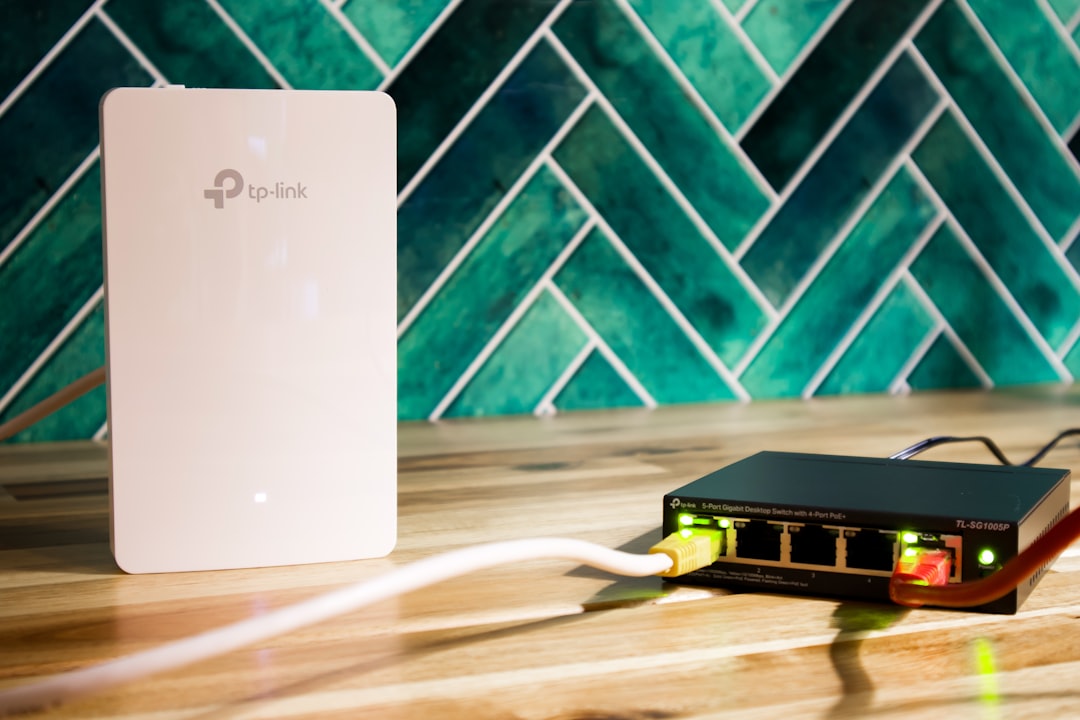
Best PoE Switches for Home Networks
If you’re running wired access points, IP cameras, or VoIP phones around your home, you’ve probably hit the same problem: you need power and data at the endpoint, but running a separate electrical outlet to every device is a serious pain. A home PoE switch solves this by delivering power and data over a single Cat5e or Cat6 cable — no outlet required at the device end. It’s one of the cleanest upgrades you can make to a wired home network.
The market has matured considerably. You can get a solid 8-port unmanaged switch for under $60, or step up to a full managed model with VLAN support, QoS, and per-port controls for around $150. Knowing which features you actually need prevents overspending — or underspending and regretting it six months later when you want to segment your camera traffic.
This guide covers the best PoE switches for home networks in 2026, broken down by use case and budget. We’ve included picks from TP-Link, NETGEAR, and Ubiquiti — the three brands that dominate the home and prosumer market.
What to Look For in a Home PoE Switch
Before jumping into specific picks, here’s what actually matters when comparing models:
- PoE budget (watts): Total wattage the switch can deliver across all PoE ports simultaneously. A switch with a 65W budget spread across 8 ports can’t power 8 devices at full draw. Know your device power requirements before buying — check the spec sheet for “PoE class” or maximum wattage per port.
- PoE vs PoE+ vs PoE++: Standard PoE (802.3af) maxes at 15.4W per port. PoE+ (802.3at) reaches 30W — necessary for dual-band access points and PTZ cameras. PoE++ (802.3bt) hits 60–90W, used for very high-draw APs and specialty hardware.
- Managed vs unmanaged: Unmanaged switches are plug-and-play — great for simple setups. Managed switches add VLANs, QoS, port monitoring, and remote visibility. For serious home networks, managed is worth the modest price jump.
- Port count: 5-port is enough for tiny deployments. 8-port is the sweet spot for most homes. 16+ ports for heavy wired infrastructure builds.
- Uplink speed: Most home switches use gigabit data ports. Higher-end models add 2.5G or SFP uplink ports for connecting to a 10G core switch.
- Form factor: Desktop vs rack-mountable. If you have a networking closet or patch panel, rack ears keep things organized. For a shelf or cabinet, desktop form is fine.
For help planning cable runs before picking your switch, see How to Add Wired Networking to an Old House. TP-Link’s PoE switch lineup page is also a good place to compare models side by side before you buy.
Best Budget Picks (Under $80)
TP-Link TL-SG1005P — Best Unmanaged 5-Port
💰 Buy on Amazon → TP-Link 5-Port Gigabit PoE Switch
The TL-SG1005P is the entry point for home power-over-Ethernet switching. It’s a 5-port gigabit switch with 4 PoE ports (802.3af/at) and a 65W total budget. At around $40–50, it’s the go-to for powering 2–3 access points or a small camera setup. No management interface, no fan noise — just plug it in and let it run.
It won’t work if you need VLANs or traffic prioritization. But for a single-AP setup or two IP cameras on a dedicated cable run, it’s hard to beat the simplicity. TP-Link’s product documentation covers the wattage specs per port if you want to double-check before buying.
TP-Link TL-SG1008P — 8 Ports, Still Unmanaged
💰 Buy on Amazon → TP-Link 8-Port PoE+ Unmanaged Switch
Scale up to 8 ports with the SG1008P. Four ports are PoE+ capable (30W each), with a 65W total budget. Fanless, desktop form, about $60 street price. Good if you’re powering 3–4 wireless access points in a multi-room wired AP deployment. According to TP-Link’s support documentation, PoE power allocation is automatic based on device negotiation — no manual configuration needed.
Best Mid-Range Managed Picks ($80–$200)
TP-Link TL-SG108PE — 8-Port Easy Smart Managed
💰 Buy on Amazon → TP-Link TL-SG108PE 8-Port Managed PoE+ Switch
The SG108PE is the sweet spot for home networkers who want managed features without enterprise complexity. Eight gigabit ports (4 PoE+), 64W total budget, VLAN support, QoS, and a web-based GUI. It handles basic traffic prioritization — genuinely useful when you’re running IP cameras, VoIP, and guest traffic on separate VLANs simultaneously.
At around $85–100, it’s one of the best-value managed options in the market. If you’re running Home Assistant with a mix of wired IoT and cameras, this is the one to buy. The VLAN setup takes about 10 minutes with the TP-Link web UI.
NETGEAR GS308EP — 8-Port Smart Managed PoE+
💰 Buy on Amazon → NETGEAR GS308EP 8-Port Smart Managed PoE+ Switch
NETGEAR’s Smart Managed Pro line sits neatly between full enterprise-managed and unmanaged. The GS308EP has 8 ports (all PoE+), 62W budget, and a polished web interface with VLAN, QoS, loop detection, and multicast control. Runs around $90–110.
One standout: NETGEAR’s Insight app lets you manage the switch remotely from a phone — handy for checking port status when you’re away. NETGEAR’s switch support documentation covers VLAN configuration and firmware updates in detail.
Ubiquiti UniFi Switch Lite 8 PoE
💰 Buy on Amazon → Ubiquiti UniFi Switch Lite 8 PoE
If you’re already running a UniFi setup — with a UniFi Dream Machine SE or similar gateway — the Switch Lite 8 PoE is the obvious home PoE switch choice. Everything integrates into the UniFi controller: switch ports, traffic stats, PoE controls, and power usage all appear alongside your access points and cameras in one dashboard.
52W total PoE budget, 8 gigabit ports (4 PoE+), fanless. Around $130. Ubiquiti’s ecosystem integration makes this worth the premium if you’re committed to the platform. Their support documentation covers network topology setup in detail.
Best High-End Picks ($200+)
TP-Link Omada SG2210P — 10-Port with SFP Uplinks
💰 Buy on Amazon → TP-Link Omada TL-SG2210P Managed PoE Switch
For larger deployments, the TL-SG2210P adds SFP flexibility. Eight PoE+ gigabit ports, 2 SFP slots for fiber or 10G uplinks, 53W PoE budget, and full Omada SDN controller support. Pair it with a TP-Link Deco BE85 WiFi 7 mesh system for a fully managed, fast home network.
The SFP uplinks are the differentiator — connect to a 10G core switch and get full gigabit throughput everywhere without a copper bottleneck. Runs around $130–160.
NETGEAR GS716TP — 16-Port Rack-Mountable PoE+
💰 Buy on Amazon → NETGEAR GS716TP 16-Port Smart Managed PoE+ Switch
For a truly expansive home infrastructure build, the GS716TP delivers 16 PoE+ ports with a 180W total budget plus 2 SFP uplink slots. It’s rack-mountable with a full L2 management suite: VLAN, QoS, RSTP, storm control, IGMP snooping, and SNMP. Around $250.
For most households this is absolute overkill. But if you’re running 8+ access points, a serious IP camera setup, VoIP phones, and a home lab simultaneously, the headroom makes sense.
How to Calculate Your PoE Budget
This is where most people get burned. Here’s the math:
Add up the maximum power draw of every device you plan to connect at the same time:
– Wi-Fi 6 access point (standard): ~12–15W
– Wi-Fi 6E / Wi-Fi 7 access point: ~20–25W
– Fixed-lens IP camera: ~7–10W
– PTZ IP camera: ~20–30W
– VoIP desk phone: ~5–7W
– Smart speaker or display: ~10–15W
If your total comes to 80W but your switch only has a 65W budget, problems will happen. Some devices won’t receive enough power, or the switch will throttle ports under load. Buy a switch with at least 20% more PoE budget than your calculated total — that buffer matters when multiple devices start up simultaneously.
Example: 4 Wi-Fi 6E APs at 25W each = 100W total. You need at least a 120W budget switch, not a 65W model.
For cable infrastructure guidance, Fluke Networks has a solid resource on PoE cabling requirements and how cable quality affects power delivery over longer runs.
Managed vs Unmanaged: What Actually Matters
For a simple home setup — 1–2 APs, a camera or two — unmanaged is perfectly fine. Plug and play, nothing to configure.
The right home PoE switch for your situation depends on how complex your network is. The case for managed switches comes down to three things:
1. VLAN isolation — keeping IoT devices off your main network, separating cameras, guest wifi segmentation
2. QoS — prioritizing video call traffic over 4K streaming when bandwidth is contested
3. Visibility — knowing which port is using what bandwidth, catching problem devices early
If you’re already using Home Network Monitoring Tools to track traffic, a managed switch feeds that with much more granular data.
For permanent cable runs, use quality cable — Cat6A Ethernet Cable is worth using for anything over 100 feet or in-wall installations. It handles PoE current better over longer distances.
Setting Up Your Home PoE Switch: First-Time Tips
Once you’ve picked the right home PoE switch for your needs, the actual setup is easy. Here’s what to do before you start plugging things in:
Map your power budget first. List every device you’re connecting and its maximum PoE wattage. Write it down. This prevents the frustrating situation where everything works fine until you add the fourth camera and two devices start acting up.
Unmanaged switch setup: Literally plug in and go. Connect your router or main switch uplink to the uplink port (usually labeled WAN or simply port 8 on 8-port models). Connect PoE devices to the numbered ports. Done. The switch handles PoE negotiation automatically.
Managed switch first steps: Connect via the web GUI (default IP is usually printed on the label — commonly 192.168.0.1 or 192.168.1.1 for TP-Link, 192.168.0.239 for NETGEAR). Change the default admin password immediately. Set your management VLAN if you want the switch management interface isolated from device traffic. Create your VLANs — typically one for trusted devices, one for IoT, one for cameras.
Label your ports. This sounds obvious but almost nobody does it on day one. Six months later, you’ll have zero idea which port feeds which room or device without labels. Colored patch cable boots or a label maker on the switch faceplate both work.
Test PoE delivery. Most managed switches show per-port PoE wattage in the GUI. Confirm your APs and cameras are drawing the expected wattage — it’s an easy way to catch a PoE negotiation problem before you seal up a wall.
Plan for redundancy. A PoE switch is a single point of failure for everything powered through it. Keep a spare unmanaged injector on the shelf for critical devices like your main AP. If the switch fails, you can keep a primary access point online with an injector while you wait for a replacement.
For tips on VLAN setup and traffic segmentation specifically, How to Protect Your Kids on WiFi covers the guest and IoT network separation approach that works well with managed switches.
For a broader look at the 802.3 PoE standard itself, Wikipedia’s Power over Ethernet article breaks down the different PoE classes, wattage specs, and the history of the standard in readable detail.
Frequently Asked Questions
Do I need a PoE switch if my router already has Ethernet ports?
Most consumer routers have standard Ethernet data ports — they don’t deliver PoE power. You’ll need a separate switch to power APs, cameras, or VoIP phones over Ethernet. A small number of prosumer router/gateway combos include PoE, but they’re the exception.
Can I connect a regular (non-PoE) device to a PoE switch port?
Yes. PoE ports only deliver power when the connected device actively negotiates it using the IEEE 802.3af/at/bt handshake. Plugging in a laptop, desktop, or any non-PoE device works exactly like a standard Ethernet connection — no power is delivered unless the device requests it.
What’s the practical difference between PoE+ and standard PoE?
Standard PoE (802.3af) caps at 15.4W available at the port. PoE+ (802.3at) delivers up to 30W. Most Wi-Fi 6 and 6E access points need PoE+ to run at full capacity. Check your AP’s spec sheet — if it lists “802.3at” or “30W” in the power specs, you need PoE+. Standard PoE will often work but may disable features like multi-radio simultaneous operation.
How many APs can I run from a 65W switch?
Depends on AP power draw. At 20W per AP: 65W ÷ 20W = 3.25, so safely 3 APs with a little headroom. For 4 APs you need at least a 90W budget switch. Don’t fill the budget exactly — leave a 15–20% buffer for startup current spikes.
Will PoE work over long cable runs?
PoE and PoE+ work reliably over Cat5e and Cat6 up to 100 meters (328 feet). For PoE++ or very high-draw devices, Cat6A is recommended for better power delivery. Beyond 100 meters, you’ll need a PoE extender or a secondary switch closer to the devices.
Is a managed switch worth it for a home with only one VLAN?
Probably not. If everything is on the same network and you don’t plan to add IoT isolation or guest segmentation, unmanaged is simpler and cheaper. Managed switches shine in multi-VLAN environments or when you want per-port traffic visibility.
Can a NAS be powered by a PoE switch?
Most NAS devices use standard AC power adapters and don’t support PoE input. Your NAS connects to a switch port for data, but still needs its own power supply. See NAS vs Home Server vs Mini PC for a full breakdown of NAS power and networking considerations.

2 Comments
Comments are closed.