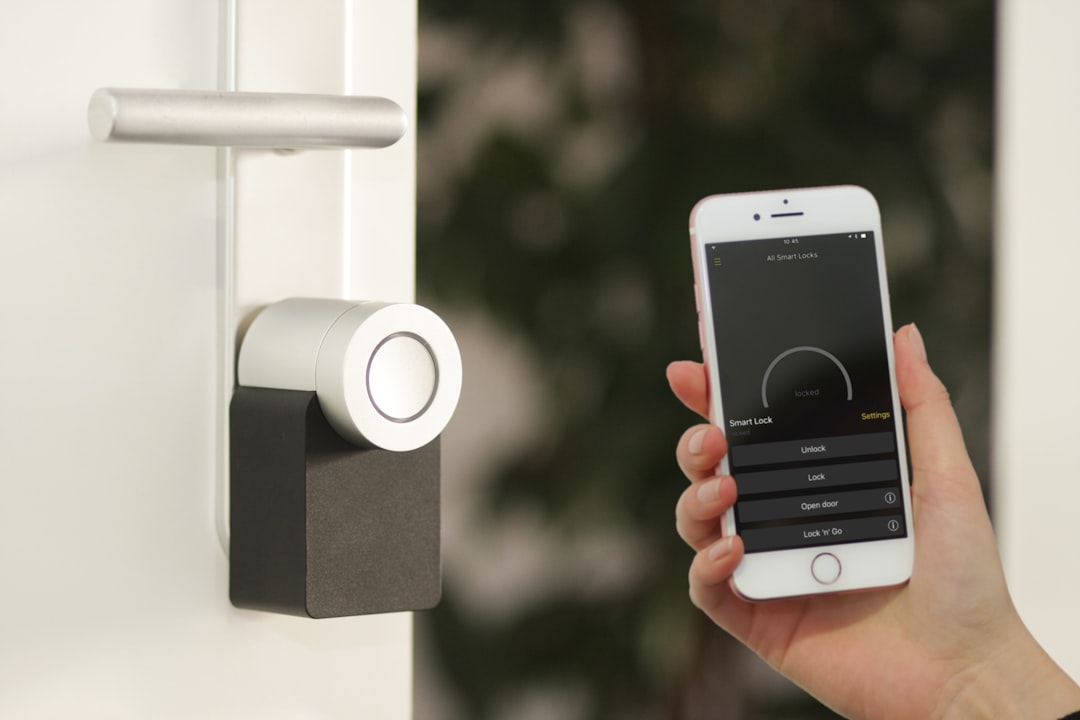
Best Smart Locks: Keyless Entry Done Right
The best smart locks in 2026 do more than let you unlock your door with a phone — they integrate with your smart home hub, create temporary access codes for guests, log who comes and goes, and work reliably when your internet goes down. Here are the best options across every budget and ecosystem.
What Makes a Smart Lock Worth Buying
Not all smart locks are equal. The cheap ones work until they don’t — battery issues, connectivity drops, firmware bugs that lock you out. Here’s what separates good from bad:
Local operation: Your lock should work without internet. Z-Wave and Zigbee locks operate locally. WiFi-only locks are cloud-dependent — if the manufacturer’s server goes down, you’re locked out.
Protocol support: Z-Wave is the gold standard for smart locks — low power, reliable, locally processed. Zigbee is similar. Matter/Thread is emerging. WiFi is convenient but adds cloud dependency and drains batteries faster.
Physical security: A smart lock with a weak physical mechanism is worse than a dumb lock. Look for ANSI/BHMA Grade 1 certification for exterior doors.
Battery life: Most smart locks run on AA or 9V batteries. Expect 6-12 months on Z-Wave/Zigbee, 3-6 months on WiFi.
Quick Comparison
| Lock | Protocol | Grade | Battery Life | Best For | Price |
|---|---|---|---|---|---|
| Schlage Encode Plus | WiFi + Matter | ANSI Grade 1 | ~6 months | Apple HomeKit | ~$280 |
| Yale Assure Lock 2 | Z-Wave/Zigbee/WiFi | ANSI Grade 2 | ~12 months | Home Assistant | ~$200 |
| Schlage BE489WB | WiFi + Matter | ANSI Grade 1 | ~6 months | Matter hubs | ~$230 |
| August Wi-Fi Smart Lock | WiFi | ANSI Grade 2 | ~6 months | Retrofit installs | ~$180 |
| Kwikset Halo Touch | WiFi + fingerprint | ANSI Grade 2 | ~6 months | Fingerprint access | ~$200 |
Our Top Picks
1. Schlage Encode Plus — Best Overall
Schlage makes the best physical locks available to consumers, and the Encode Plus brings that quality to the smart lock category. ANSI Grade 1 certified (the highest residential rating), Matter support, WiFi, and Apple HomeKit compatibility out of the box.
The physical quality is immediately noticeable. The deadbolt mechanism is smooth and solid — this is a lock that will last 20 years. Most smart locks feel plasticky by comparison.
Matter support means the Encode Plus works with Apple Home, Google Home, Amazon Alexa, and Home Assistant without a hub or bridge. Pair it once and control it from any platform.
What we like:
– ANSI Grade 1 — best physical security available
– Matter native — works with every major hub
– Built-in keypad — no phone needed for entry
– Schlage’s legendary durability
What to watch:
– WiFi only — cloud dependent (Matter helps but doesn’t fully eliminate this)
– Higher price than competitors
2. Yale Assure Lock 2 — Best for Home Assistant / Z-Wave
Yale’s Assure Lock 2 is the smart lock of choice for Home Assistant users because it’s available in Z-Wave, Zigbee, and WiFi variants — and the Z-Wave version gives you fully local operation that works without internet.
Combined with Home Assistant, the Z-Wave Yale provides: local lock/unlock, access code management, battery monitoring, door open/closed sensing, and automations that fire in milliseconds without cloud round-trips.
Access codes: The Assure Lock 2 stores up to 250 PIN codes. Create temporary codes for guests, recurring codes for cleaners, and time-limited codes for deliveries — all managed from Home Assistant or the Yale app.
What we like:
– Z-Wave variant = fully local operation
– 250 access codes
– Works offline
– Good Home Assistant integration
What to watch:
– Z-Wave version requires a Z-Wave hub (SmartThings, Home Assistant with Z-Wave stick)
– ANSI Grade 2 (adequate for residential, but Grade 1 is better)
3. August Wi-Fi Smart Lock — Best Retrofit
The August is unique: it replaces only the interior thumb turn, leaving your existing deadbolt mechanism in place. Installation takes 10 minutes and requires no locksmith. If you’re renting or want to keep your existing keys working, this is the only smart lock that makes sense.
Auto-lock and auto-unlock based on phone proximity are August’s signature features. Your door unlocks as you approach and locks behind you — no app interaction needed. Works reliably with proper Bluetooth and WiFi calibration.
What we like:
– Retrofit — keeps existing exterior hardware
– Fastest installation of any smart lock
– Auto-unlock works well
– Existing keys still function
What to watch:
– WiFi only — cloud dependent
– Interior-only replacement means your exterior hardware ages independently
– Less physical security than full deadbolt replacements
Z-Wave vs WiFi vs Matter: Which Protocol Should You Choose?
Z-Wave: Best for smart home enthusiasts. Local processing, low battery drain, excellent reliability. Requires a Z-Wave hub (SmartThings, Home Assistant + Z-Wave USB stick). Worth the complexity for users who value local control.
WiFi: Most convenient — works with any home network, no hub required. Trade-off: cloud dependency, higher battery drain, potential for lockouts if manufacturer servers go down.
Matter/Thread: The future. Local processing via Thread, cross-platform compatibility via Matter. Limited lock options today but growing fast. The Schlage Encode Plus is the current best option.
Recommendation: Z-Wave for Home Assistant users. Matter for everyone else who wants local operation without a dedicated hub.
Security Considerations
ANSI/BHMA Grading:
– Grade 1: Highest residential security. Tested to 250,000 cycles, 360 lb door force resistance.
– Grade 2: Standard residential. 150,000 cycles, 250 lb resistance.
– Grade 3: Basic/light residential. Not recommended for exterior doors.
A Grade 3 smart lock with fancy app features is less secure than a Grade 1 dumb deadbolt. Don’t sacrifice physical security for smart features.
Backup access: Every smart lock should have a physical key backup. Dead batteries, app failures, and connectivity issues happen — always have a way in.
Bottom Line
Best overall security and Matter integration: Schlage Encode Plus. Best for Home Assistant and local control: Yale Assure Lock 2 (Z-Wave). Best retrofit without replacing hardware: August Wi-Fi Smart Lock.
Prices checked February . Affiliate links help support wiredhaus at no extra cost to you.
Smart Lock Protocols: Z-Wave, Zigbee, Wi-Fi, Thread, and Matter
The protocol your lock uses determines how it integrates with the rest of your smart home. Here’s a practical breakdown:
- Z-Wave: The legacy standard for locks. Reliable, encrypted, low battery drain. Requires a Z-Wave hub (SmartThings, Hubitat, Home Assistant with Z-Wave stick). Most Schlage and Yale professional-grade locks use Z-Wave.
- Zigbee: Similar to Z-Wave but uses the 2.4GHz band (more congested). Fewer locks use Zigbee compared to Z-Wave.
- Wi-Fi: Easiest to set up, no hub required. Downside: higher battery drain, dependent on your Wi-Fi network staying up. August Wi-Fi Connect is the dominant option here.
- Matter over Thread: The future standard. Low power, hub-optional, works with any Matter controller. Thread border routers (HomePod mini, Echo 4th gen, Eero 6+) are required. Lock availability in is growing but not ubiquitous.
Security Considerations: Not All Smart Locks Are Equal
The “smart” part doesn’t automatically make a lock secure. Physical security still matters: a Grade 1 ANSI-rated deadbolt is harder to kick in than a Grade 3. Check the ANSI/BHMA rating before buying any lock, regardless of how smart it is.
Encryption and firmware updates matter too. Look for locks that use AES-128 encryption for wireless communication and have a track record of releasing security patches. Schlage and Yale both have strong security track records. Some budget locks from lesser-known brands have had documented vulnerabilities.
Auto-lock is your safety net — set it. A lock that auto-locks after 30-60 seconds covers the times you forget. Most smart locks support this; set it up during initial configuration.
Installation: What’s Actually Involved
Most smart deadbolts replace the interior assembly only — the exterior cylinder and strike plate stay. Installation takes 15-30 minutes with a screwdriver. The exception: full replacement locks that swap both sides (common for keypad-only models like the Level Bolt invisible, Wyze Lock Bolt).
Compatibility matters: most smart locks fit standard US door prep (2-1/8″ hole with 2-3/8″ or 2-3/4″ backset). If your door has a non-standard prep, check measurements before ordering.
Top Picks by Use Case
- Best overall: Schlage Encode Plus — Apple Home Key support, built-in Wi-Fi, excellent build quality, Matter support added via firmware.
- Best for Home Assistant: Schlage BE469 (Z-Wave) — bulletproof Z-Wave integration, excellent physical security, no cloud dependency.
- Best budget: Wyze Lock Bolt — $60, fingerprint reader, simple app, no hub required. Limited integration options but solid for basic use.
- Best for rental/apartments: Level Bolt — completely invisible from the outside (uses your existing exterior hardware), Bluetooth + Wi-Fi bridge.
Access Codes: Managing Guests and Cleaners
Creating and revoking access codes is where smart locks genuinely improve daily life. Most locks support 50-250 codes. Use unique codes for each person rather than sharing one — you can revoke individually without affecting others. Time-limited codes (e.g., valid only Tuesday 9am-5pm) are useful for recurring service providers.
Frequently Asked Questions
How long do batteries last in a smart lock?
Z-Wave and Zigbee locks: 6-12 months on AA batteries. Wi-Fi locks: 3-6 months. All smart locks will warn you via app notification when batteries run low — most also beep at the lock itself. Keep spare batteries nearby.
Can a smart lock be hacked?
Remote hacking of a properly configured smart lock is very difficult. The more realistic threat is physical bypass (bumping, picking, brute force). Choose a lock with a high ANSI security rating. Disable any auto-open features that activate when your phone is nearby — these are convenient but reduce security.
Do smart locks work in power outages?
Yes — all smart locks have battery backup. The smart features (remote access, app control) may not work if your internet is down, but the physical keypad and code entry always work.
Installation and Setup: What to Expect
Most smart locks replace a standard deadbolt and take 20-30 minutes to install. You’ll need a Phillips screwdriver and possibly a drill if your door prep doesn’t match the lock’s requirements.
Before you buy, check:
- Door thickness: Most locks fit 1-3/8″ to 1-3/4″ doors. Thicker doors need extension kits.
- Backset: 2-3/8″ or 2-3/4″ — measure the distance from the edge of the door to the center of the hole. Most locks accommodate both.
- Deadbolt type: Single-cylinder deadbolts are standard and what most smart locks replace. Double-cylinder deadbolts (keyed on both sides) require specific locks.
Hub pairing: Z-Wave and Zigbee locks need a compatible hub — SmartThings, Home Assistant with the right USB stick, Hubitat, or a dedicated hub. Pair the lock before finalizing door installation so you can reach the hub easily. WiFi locks pair directly to your network; no hub required.
Battery tips: Use alkaline batteries, not rechargeable NiMH. NiMH batteries have lower voltage that can cause intermittent operation and premature low-battery warnings. A good smart lock app will show battery percentage — set an automation to notify you when it drops below 20%.
Access Code Management Best Practices
Smart locks are only as secure as your code management. A few principles:
- Create unique codes for each person. Never share your personal code. Unique codes mean you can revoke access individually without changing the master code.
- Set expiring codes for contractors and guests. Every lock on this list supports time-limited codes. A plumber who visits Tuesday doesn’t need Friday access.
- Audit the access log regularly. Most smart lock apps log every entry with code ID and timestamp. Review monthly — unexpected entries are an early warning sign.
- Delete codes when people move out. Obvious but frequently skipped. Old codes from previous tenants or employees are a real security risk.
- Test your physical key backup. Keep a physical key and test it annually. Smart locks with dead batteries still open with a key — but a key that’s been sitting in a drawer for 2 years may need lubrication to turn smoothly.
Z-Wave vs Zigbee vs Bluetooth vs Wi-Fi: Smart Lock Protocol Comparison
Smart lock protocols determine how reliably the lock responds and whether it needs a hub. Z-Wave locks (Schlage, Yale) are the most reliable for Home Assistant — the protocol is designed for low-latency, mesh-based commands. Zigbee locks exist but are less common. Bluetooth-only locks like most August models require a phone nearby or an additional Wi-Fi bridge. Wi-Fi locks work without a hub but drain batteries faster.
- Z-Wave (Schlage BE469): Best reliability for HA, requires a Z-Wave controller
- Zigbee (Yale Assure 2): Works with HA ZHA or Z2M, good device support
- Bluetooth + Wi-Fi bridge (August): Adds latency, bridge required for remote access
- Wi-Fi native (Kwikset Halo): No hub needed, uses more battery
Battery Life in Real-World Use
Smart lock battery claims rarely match reality. A Z-Wave lock rated for 12 months typically lasts 8–10 months with normal use. Bluetooth locks that poll for connections drain faster — expect 6–9 months. If you automate entry and exit triggers, lock batteries drain 20–30% faster due to status reporting. Use lithium AA batteries — they perform significantly better in cold weather and have higher capacity than alkaline.
- Schlage BE469: 12+ months on 4 AA batteries in practice
- August Wi-Fi Smart Lock: 3–6 months on 4 AA batteries
- Recommendation: Energizer complete Lithium AA for all smart locks
Backup Entry: Never Get Locked Out
Every smart lock should have a physical key backup. Electronic failures happen — dead batteries, failed firmware updates, lost hub connectivity. Choose a lock that provides a traditional key cylinder. Avoid locks that are purely electronic with no physical key option. For an additional backup, store a spare key in a wall-mounted lockbox rated for outdoor use.

One Comment
Comments are closed.